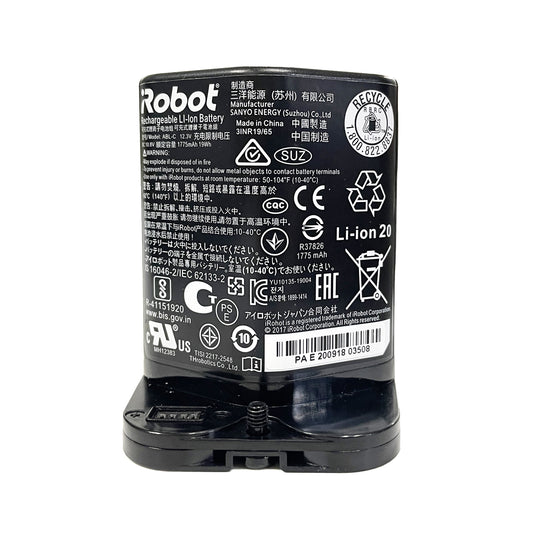
iRobot roomba battery replacement-FAQ
Which situations suggest that it's time to replace the battery?
1、The iRobot panel indicates "ERR5" which usually indicates a battery issue. "ERR7" maybe indicate a battery problem as well. For more details, please contact customer service for confirmation.
2、If the battery only work for less than 45 minutes when fully charged; the battery turns green only charged for about 30 minutes; iRobot reminds you to charge Roomba when it is working; it is not advisable to always return to the base for charging normally. In such cases, the battery should generally be replaced.
3、A fully charged battery can generally operate for 2 to 3 hours. However, it is important to note that the machine usually returns to the base after working for approximately 60 minutes from the base. This does not mean that the battery has completely run out; it may not necessarily be a battery issue. When the machine returns to the base, it usually reserves some power to ensure it can return to charging normally.
Can you replace the battery in an iRobot?
Absolutely! You can replace the battery in an iRobot, and it’s actually pretty straightforward. You don’t need to be a technician. Here’s a install guide:
- Identify your model – Check your iRobot’s model number (e.g., Roomba 600, 900, i7, s9) because batteries differ between models.
- Get a compatible battery – Look for a genuine or high-quality replacement battery matching your model, usually listed with mAh and voltage specs.
- Power off and flip the robot – Make sure the Roomba is off, then flip it upside down.
- Remove the battery cover – Usually held by a small latch or screws.
- Swap the battery – Take out the old battery and insert the new one in the correct orientation.
- Secure the cover and charge – Close the battery compartment and fully charge the robot before the first cleaning session.
Pro tip: If you are unable to use it after installation, please send us a video with email. Many of our customers were unable to charge their devices after installation, they think battery have a problem. However, it was later discovered that the issue was due to some problems with their operation methods.
What kind of battery does the iRobot use?
Accessories-Mall's iRobot Roomba robot vacuums use rechargeable batteries.
If you want to know which battery your iRobot uses?Please Check the model number on the bottom of the robot and
Look at the original battery label.
Why the battery can't be charged which purchased at Accessories-Mall?
We have 100% confidence in the quality of the batteries we have sold.
If the batteries cannot be charged.
Please first make sure that your device is in good condition.
Secondly, please make sure that the installation was carried out correctly. If you have done both of the above steps but still cannot charge the device, please contact us and attach the installation video.
Once we determine the problem, we will resend it to you again. But the probability of battery quality issues occurring is less than one percent. Usually, it is due to the customer not installing it correctly or the deice already broken.
How do I know if my Roomba robot vacuum needs a new battery?
Your Roomba may need a replacement battery if it runs for a shorter time than before,
stops cleaning in the middle of a cycle, returns to the charging dock frequently,
or cannot hold a charge after being fully charged. A worn-out battery is one of the
most common reasons for reduced Roomba cleaning performance.
Which replacement battery is compatible with my iRobot Roomba model?
The correct Roomba replacement battery depends on your robot vacuum model and
original battery part number. For example, ABL-D1 batteries are commonly used for
Roomba i7, i7+, j7, j7+, i4+, e5, and e6 models, while ABL-D2/D2A batteries fit
many newer i, j, and Combo series models. Always check your original battery label
before ordering.
Can I replace the Roomba battery myself without professional tools?
Yes. Most Roomba replacement batteries are designed for easy installation.
In many cases, you only need a screwdriver to remove the battery cover,
disconnect the old battery, and install the new replacement battery.
Always turn off your Roomba before replacing the battery.
What is the difference between ABL-D1 and ABL-F Roomba batteries?
ABL-D1 and ABL-F batteries are designed for different Roomba models.
ABL-D1 is commonly used in several Roomba i and j series models, while
ABL-F batteries provide compatibility with selected iRobot i, j, and e series
robots that require higher capacity battery specifications.
Check your Roomba model number to choose the correct battery.
Why does my Roomba battery die quickly after charging?
A Roomba battery that loses power quickly may have reached the end of its
charging cycle life. Other possible causes include dirty brushes, blocked
airflow, or increased motor workload. Replacing an aging battery can help
restore longer cleaning sessions.
How long does a replacement Roomba battery usually last?
The lifespan of a Roomba replacement battery depends on usage frequency,
charging habits, cleaning environment, and battery quality. With proper care,
a quality rechargeable battery can provide reliable performance for many
cleaning cycles.
Is a high capacity Roomba battery better than the original battery?
A high capacity replacement Roomba battery can provide longer runtime between
charges, which is useful for larger homes, multiple rooms, or homes with pets.
However, compatibility with your specific Roomba model is more important than
choosing the highest capacity option.
Which Roomba battery replaces the 4376392 battery?
The 4376392 replacement battery is compatible with many Roomba 600, 700,
800, and selected 900 series robot vacuum models. Before purchasing,
compare the battery part number and voltage specifications with your original
battery to ensure a proper match.
Can I use an ABL-D2 battery for Roomba j7+ and j8+ models?
Yes, ABL-D2 and ABL-D2A replacement batteries are designed for compatibility
with various Roomba j7+, j8+, i8+, i4+, i6, i7+, and related models.
Confirm your exact model number before installation.
How can I extend the life of my Roomba replacement battery?
To improve battery lifespan, keep your Roomba charging when not in use,
avoid extreme temperatures, clean brushes and filters regularly, and prevent
the robot from working harder than necessary due to debris buildup.
Why does my Roomba stop before finishing a cleaning job?
If your Roomba stops before completing a cleaning cycle, the battery may not
have enough remaining capacity. Installing a compatible replacement battery
can restore longer runtime and help your robot complete more cleaning tasks
in one session.
Where can I buy a reliable replacement battery for my iRobot Roomba?
A reliable replacement battery should match your Roomba model, voltage,
capacity requirements, and connector design. Accessories-Mall offers
replacement Roomba batteries for multiple iRobot series with compatibility
information to help customers choose the correct battery.