ACCESSORIES-MALL
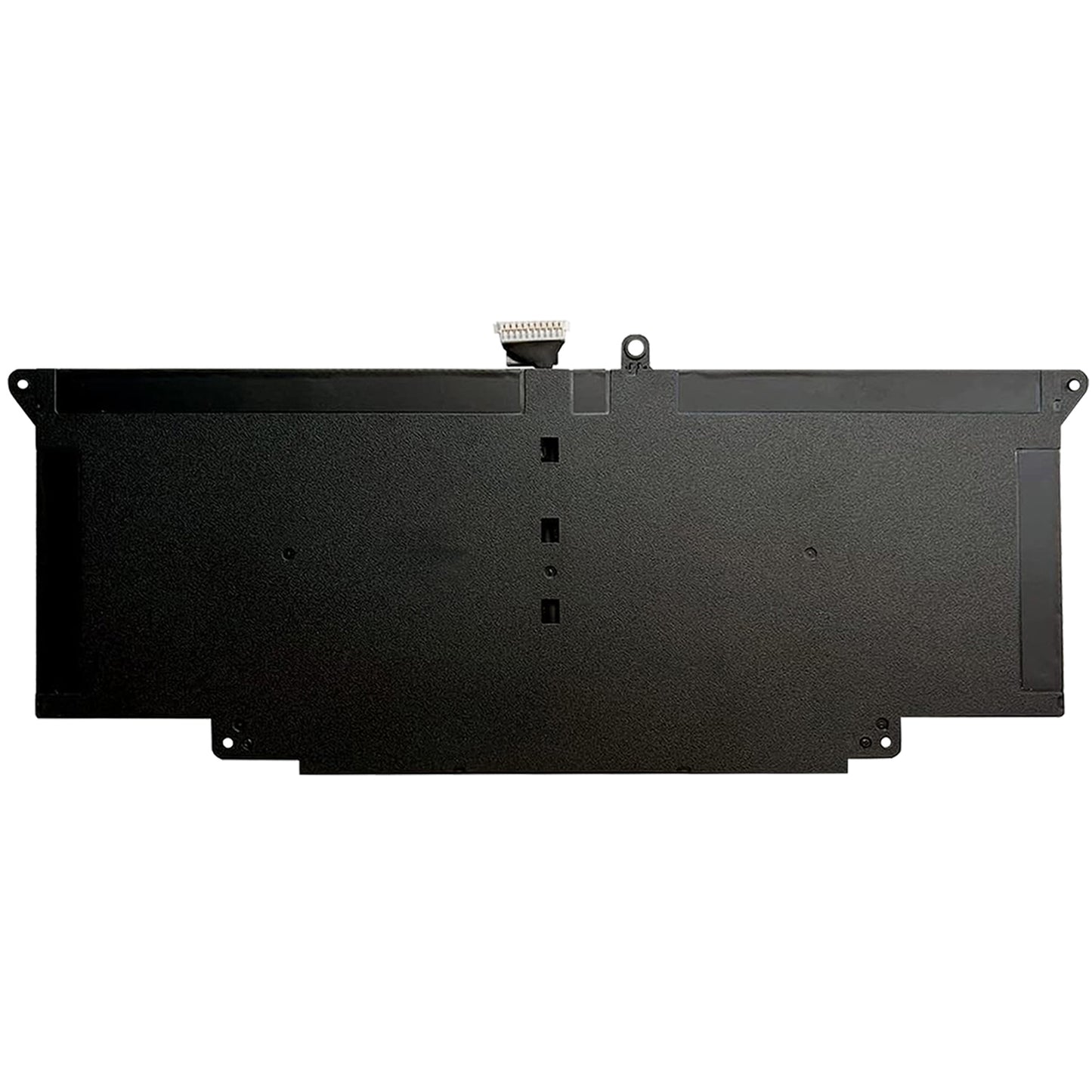
Genuine Dell JHT2H 52Wh Laptop Battery for Latitude 7310 & 7410 Series – 0WY9MP Replacement
Couldn't load pickup availability
Genuine 52Wh JHT2H vs. Generic: How to Choose the Right Replacement Battery for Your Dell Latitude 7310 / 7410 Series
If you rely on a Dell Latitude 7310 or 7410 for work, you already know: these laptops are built for business—reliable, portable, and designed to get you through a full day. But when the original battery starts to fade, that “all‑day” productivity turns into a midday scramble for an outlet.
When it’s time to replace the JHT2H battery (52Wh, also referenced as 0WY9MP), you have choices: pay Dell’s OEM price, gamble on a cheap generic, or find a genuine‑spec replacement that delivers the same performance without the inflated markup.
This guide covers the 52Wh JHT2H battery for Dell Latitude 7310 and 7410 series—what makes it different, how to spot a reliable replacement, and which option actually makes sense for your workday.
What Exactly Is the Dell JHT2H 52Wh Battery?
The JHT2H (also labeled 0WY9MP) is the factory‑spec lithium‑ion battery designed for the Dell Latitude 7310 and 7410 series. At 52 watt‑hours, it’s built to deliver extended runtime in a slim business laptop form factor—giving you the freedom to work through flights, client meetings, and full workdays without hunting for an outlet.
| Specification | Value |
|---|---|
| Model / Part Numbers | JHT2H, 0WY9MP |
| Compatible Models | Dell Latitude 7310, 7410 series (including 2‑in‑1 variants) |
| Compatible Part Numbers: |
JHT2H 04V5X2 0HRGYV 07CXN6 35J09 0YJ9RP 009YYF |
| Compatible Laptop Models : |
Dell Latitude 7310 Series Dell Latitude 7410 Series Dell Latitude 7410 2-in-1 Series Dell Latitude 7310 2-in-1 Series Dell Latitude 7410 Chromebook Enterprise / 2-in-1 Chromebook Enterprise |
| Capacity | 52 WHr (watt‑hours) |
| Chemistry | Lithium‑ion (high‑density cells) |
| Voltage | 7.6 V nominal |
| Safety Features | Over‑charge, over‑discharge, short‑circuit protection, temperature monitoring |
A healthy JHT2H battery means your Latitude actually delivers the all‑day battery life it was designed for—not a device that lives on a charger.
Genuine‑Spec vs. OEM vs. Generic: What’s Actually Different?
Not every battery that “fits” your Latitude behaves the same. Here’s what separates a reliable replacement from one that may leave you stranded mid‑presentation.
| Factor | Genuine‑Spec Replacement (JHT2H 52Wh) | OEM (Dell Original) | Typical Generic / No‑Name |
|---|---|---|---|
| Cell Quality | OEM‑matched cells (LG / Samsung / Murata grade) | Original manufacturer cells | Unknown or lower‑grade cells; capacity often overstated |
| Capacity | True 52Wh, consistent with original | 52Wh | Often under‑rated; actual capacity may be 20–30% less |
| Protection Circuit | Full PCM with over‑voltage, under‑voltage, short‑circuit, temperature protection | Full protection | Minimal or missing protection; higher risk of swelling or failure |
| BIOS / EC Communication | Accurate fuel gauge; Windows shows true remaining runtime and health | Accurate | May fail to communicate correctly; laptop may not charge or may show incorrect percentage |
| Physical Fit | Exact fit; connector aligns perfectly | Exact fit | May be slightly off; connector may not seat fully |
| Charging Behavior | Supports Dell ExpressCharge (if laptop supports it) | Supports Dell ExpressCharge | May charge slowly, overheat, or stop charging prematurely |
| Longevity | 400–500 cycles while maintaining >80% capacity | 400–500 cycles | Often drops below 70% capacity within 6–12 months |
| Price | Moderate (sweet spot) | Highest (often 2×) | Lowest but highest risk |
⚠️ Important
The JHT2H is an internal battery. If you install a generic that doesn’t communicate properly with the laptop’s embedded controller, you may not know until you’ve already closed up the case—and then you’re stuck with a laptop that won’t charge correctly, won’t show accurate battery percentage, or shuts down unexpectedly. For a business laptop you depend on daily, that’s a risk you don’t want to take.
One Battery vs. Spare: What’s the Real Need?
Since the JHT2H is internal and not designed for quick swapping, the decision is usually “replace the aging one” rather than “carry a spare.” But there’s still a choice: do you replace with a cheap generic and hope, or invest in a genuine‑spec replacement that lasts?
| Situation | Cheap Generic | Genuine‑Spec Replacement |
|---|---|---|
| You need the laptop to last through a full workday | Risky; unknown runtime, possible unexpected shutdowns | ✔ Consistent performance you can rely on |
| You travel frequently for business | Unreliable; could die during a flight or client meeting | ✔ Dependable runtime when you need it most |
| You plan to keep the Latitude for another 2–3 years | Will likely need another replacement within a year | ✔ One replacement covers the rest of the laptop’s useful life |
| You’re selling the laptop or passing it to a colleague | A generic signals “cheap repair” to a buyer | ✔ A genuine‑spec replacement adds value and confidence |
| You work near outlets most of the time | Might be acceptable if you don’t mind the risk | ✔ Still a better long‑term value |
For most Latitude users—especially business professionals who depend on their laptop—the extra cost of a genuine‑spec battery pays for itself in the first year. Avoiding a mid‑meeting shutdown alone is worth the difference.
How to Identify a Reliable JHT2H Replacement
Based on feedback from IT departments and repair shops, here are three things to look for when buying a JHT2H battery:
-
Exact Part Number Match
The battery should clearly list JHT2H or 0WY9MP. If it says “fits Latitude 7310” but doesn’t include these specific numbers, it’s likely a generic with unknown internals. -
Built‑in Safety Protection
Ensure the battery includes a PCM (protection circuit module) with over‑voltage, under‑voltage, short‑circuit, and temperature protection. This is non‑negotiable for internal laptop batteries. -
Fresh Stock & Warranty
Lithium‑ion cells degrade even when unused. A trustworthy supplier will provide a manufacturing date (or guarantee freshness within the last 12 months) and offer a 12‑18 month warranty. Avoid sellers who can’t provide these details.
What Does a Genuine Dell JHT2H Battery Cost?
Pricing varies significantly based on source and authenticity.
| Source | Typical Price Range (USD) | What You Get |
|---|---|---|
| OEM (Dell direct / authorized service) | $90 – $130 | Genuine, but with full retail markup |
| Third‑party “Compatible” | $30 – $50 | Unknown cell quality; often lower actual capacity; short lifespan |
| Genuine‑Spec Replacement (This Battery) | $50 – $75 | OEM‑matched cells, true 52Wh capacity, full protection circuit, exact compatibility, warranty |
The genuine‑spec replacement hits the sweet spot: the same internal quality as the OEM version, sold without the inflated brand markup. You avoid the gamble of a generic without paying the premium Dell price.
Frequently Asked Questions
Q: Will this battery work with my specific Dell Latitude?
Yes, if your model is in the compatible list. This JHT2H battery is designed for the Dell Latitude 7310 and 7410 series (including standard and 2‑in‑1 variants). To confirm, check your current battery label—if it says JHT2H or 0WY9MP, this is the direct replacement.
Q: How do I know if my current battery needs replacement?
Common signs:
-
The laptop shuts down when unplugged despite showing remaining charge
-
Battery percentage jumps erratically (e.g., 60% to 10% suddenly)
-
Windows reports “consider replacing your battery” in the battery health report
-
The battery takes unusually long to charge, or doesn’t charge at all
-
Physical swelling (you may notice the touchpad or bottom case bulging)
If your battery is more than 2–3 years old or has seen heavy daily use, it’s likely time.
Q: Can I install the JHT2H battery myself?
Yes, but it requires opening the laptop. The JHT2H is an internal battery that connects to the motherboard via a connector. If you’re comfortable with basic laptop repair (removing the bottom cover, disconnecting the old battery, connecting the new one), it’s a straightforward job. If not, a local repair shop can do it quickly. Always power down and disconnect the charger before opening the case.
Q: Will a third‑party battery void my Dell warranty?
No. In most regions (including the US, under the Magnuson‑Moss Warranty Act), using a third‑party replacement part does not void the warranty unless the part itself caused damage. If your laptop is still under warranty, keep the original battery in case service is needed.
Q: Does this battery support Dell ExpressCharge?
Yes. This genuine‑spec battery supports the same charging protocols as the original. If your Latitude supports Dell ExpressCharge, this battery will charge accordingly (typically reaching 80% in about an hour).
Q: How long does a full charge last on the Latitude with this battery?
It depends on your workload. For typical office productivity (email, browsing, Office apps), you can expect 6–8 hours on a healthy 52Wh battery. More demanding tasks will reduce runtime. This battery meets the original runtime specifications—a generic with lower actual capacity will deliver significantly less.
Q: Is it safe to buy a third‑party Latitude battery?
Yes, if it’s a genuine‑spec replacement. The key is to verify the OEM‑matched cells, true 52Wh capacity, built‑in protection circuit, and warranty. Avoid sellers who can’t confirm these details or whose prices are suspiciously low—those are often the batteries that swell or fail within months.
Ready to Get Your Latitude Back to All‑Day Productivity?
Don’t let a worn‑out battery turn your business laptop into a desk‑bound machine. This genuine‑spec JHT2H 52Wh replacement gives you the same performance and safety as the original—at a price that makes replacing an aging battery a straightforward decision.
Click ‘Add to Cart’—and get back to working where you want, not just where there’s an outlet

-
Guaranteed to be brand new
The batteries we sell are all brand-new ones. We do not offer refurbished or used batteries.Quality is king, and integrity is the foundation.
-
1-Year Warranty
Our high-performance batteries offer reliable power, free replacement service, and fast worldwide shipping.
-
30-Day Return Guarantee
Enjoy a 30-Day Return Guarantee with free exchange or full refund.Fast shipping, and easy returns.
-
24/7 Friendly Support
Our 24/7 friendly customer support ensures fast help, technical guidance, and order assistance whenever you need it.
Genuine 52Wh JHT2H vs. Generic: How to Choose the Right Replacement Battery for Your Dell Latitude 7310 / 7410 Series
If you rely on a Dell Latitude 7310 or 7410 for work, you already know: these laptops are built for business—reliable, portable, and designed to get you through a full day. But when the original battery starts to fade, that “all‑day” productivity turns into a midday scramble for an outlet.
When it’s time to replace the JHT2H battery (52Wh, also referenced as 0WY9MP), you have choices: pay Dell’s OEM price, gamble on a cheap generic, or find a genuine‑spec replacement that delivers the same performance without the inflated markup.
This guide covers the 52Wh JHT2H battery for Dell Latitude 7310 and 7410 series—what makes it different, how to spot a reliable replacement, and which option actually makes sense for your workday.
What Exactly Is the Dell JHT2H 52Wh Battery?
The JHT2H (also labeled 0WY9MP) is the factory‑spec lithium‑ion battery designed for the Dell Latitude 7310 and 7410 series. At 52 watt‑hours, it’s built to deliver extended runtime in a slim business laptop form factor—giving you the freedom to work through flights, client meetings, and full workdays without hunting for an outlet.
| Specification | Value |
|---|---|
| Model / Part Numbers | JHT2H, 0WY9MP |
| Compatible Models | Dell Latitude 7310, 7410 series (including 2‑in‑1 variants) |
| Compatible Part Numbers: |
JHT2H 04V5X2 0HRGYV 07CXN6 35J09 0YJ9RP 009YYF |
| Compatible Laptop Models : |
Dell Latitude 7310 Series Dell Latitude 7410 Series Dell Latitude 7410 2-in-1 Series Dell Latitude 7310 2-in-1 Series Dell Latitude 7410 Chromebook Enterprise / 2-in-1 Chromebook Enterprise |
| Capacity | 52 WHr (watt‑hours) |
| Chemistry | Lithium‑ion (high‑density cells) |
| Voltage | 7.6 V nominal |
| Safety Features | Over‑charge, over‑discharge, short‑circuit protection, temperature monitoring |
A healthy JHT2H battery means your Latitude actually delivers the all‑day battery life it was designed for—not a device that lives on a charger.
Genuine‑Spec vs. OEM vs. Generic: What’s Actually Different?
Not every battery that “fits” your Latitude behaves the same. Here’s what separates a reliable replacement from one that may leave you stranded mid‑presentation.
| Factor | Genuine‑Spec Replacement (JHT2H 52Wh) | OEM (Dell Original) | Typical Generic / No‑Name |
|---|---|---|---|
| Cell Quality | OEM‑matched cells (LG / Samsung / Murata grade) | Original manufacturer cells | Unknown or lower‑grade cells; capacity often overstated |
| Capacity | True 52Wh, consistent with original | 52Wh | Often under‑rated; actual capacity may be 20–30% less |
| Protection Circuit | Full PCM with over‑voltage, under‑voltage, short‑circuit, temperature protection | Full protection | Minimal or missing protection; higher risk of swelling or failure |
| BIOS / EC Communication | Accurate fuel gauge; Windows shows true remaining runtime and health | Accurate | May fail to communicate correctly; laptop may not charge or may show incorrect percentage |
| Physical Fit | Exact fit; connector aligns perfectly | Exact fit | May be slightly off; connector may not seat fully |
| Charging Behavior | Supports Dell ExpressCharge (if laptop supports it) | Supports Dell ExpressCharge | May charge slowly, overheat, or stop charging prematurely |
| Longevity | 400–500 cycles while maintaining >80% capacity | 400–500 cycles | Often drops below 70% capacity within 6–12 months |
| Price | Moderate (sweet spot) | Highest (often 2×) | Lowest but highest risk |
⚠️ Important
The JHT2H is an internal battery. If you install a generic that doesn’t communicate properly with the laptop’s embedded controller, you may not know until you’ve already closed up the case—and then you’re stuck with a laptop that won’t charge correctly, won’t show accurate battery percentage, or shuts down unexpectedly. For a business laptop you depend on daily, that’s a risk you don’t want to take.
One Battery vs. Spare: What’s the Real Need?
Since the JHT2H is internal and not designed for quick swapping, the decision is usually “replace the aging one” rather than “carry a spare.” But there’s still a choice: do you replace with a cheap generic and hope, or invest in a genuine‑spec replacement that lasts?
| Situation | Cheap Generic | Genuine‑Spec Replacement |
|---|---|---|
| You need the laptop to last through a full workday | Risky; unknown runtime, possible unexpected shutdowns | ✔ Consistent performance you can rely on |
| You travel frequently for business | Unreliable; could die during a flight or client meeting | ✔ Dependable runtime when you need it most |
| You plan to keep the Latitude for another 2–3 years | Will likely need another replacement within a year | ✔ One replacement covers the rest of the laptop’s useful life |
| You’re selling the laptop or passing it to a colleague | A generic signals “cheap repair” to a buyer | ✔ A genuine‑spec replacement adds value and confidence |
| You work near outlets most of the time | Might be acceptable if you don’t mind the risk | ✔ Still a better long‑term value |
For most Latitude users—especially business professionals who depend on their laptop—the extra cost of a genuine‑spec battery pays for itself in the first year. Avoiding a mid‑meeting shutdown alone is worth the difference.
How to Identify a Reliable JHT2H Replacement
Based on feedback from IT departments and repair shops, here are three things to look for when buying a JHT2H battery:
-
Exact Part Number Match
The battery should clearly list JHT2H or 0WY9MP. If it says “fits Latitude 7310” but doesn’t include these specific numbers, it’s likely a generic with unknown internals. -
Built‑in Safety Protection
Ensure the battery includes a PCM (protection circuit module) with over‑voltage, under‑voltage, short‑circuit, and temperature protection. This is non‑negotiable for internal laptop batteries. -
Fresh Stock & Warranty
Lithium‑ion cells degrade even when unused. A trustworthy supplier will provide a manufacturing date (or guarantee freshness within the last 12 months) and offer a 12‑18 month warranty. Avoid sellers who can’t provide these details.
What Does a Genuine Dell JHT2H Battery Cost?
Pricing varies significantly based on source and authenticity.
| Source | Typical Price Range (USD) | What You Get |
|---|---|---|
| OEM (Dell direct / authorized service) | $90 – $130 | Genuine, but with full retail markup |
| Third‑party “Compatible” | $30 – $50 | Unknown cell quality; often lower actual capacity; short lifespan |
| Genuine‑Spec Replacement (This Battery) | $50 – $75 | OEM‑matched cells, true 52Wh capacity, full protection circuit, exact compatibility, warranty |
The genuine‑spec replacement hits the sweet spot: the same internal quality as the OEM version, sold without the inflated brand markup. You avoid the gamble of a generic without paying the premium Dell price.
Frequently Asked Questions
Q: Will this battery work with my specific Dell Latitude?
Yes, if your model is in the compatible list. This JHT2H battery is designed for the Dell Latitude 7310 and 7410 series (including standard and 2‑in‑1 variants). To confirm, check your current battery label—if it says JHT2H or 0WY9MP, this is the direct replacement.
Q: How do I know if my current battery needs replacement?
Common signs:
-
The laptop shuts down when unplugged despite showing remaining charge
-
Battery percentage jumps erratically (e.g., 60% to 10% suddenly)
-
Windows reports “consider replacing your battery” in the battery health report
-
The battery takes unusually long to charge, or doesn’t charge at all
-
Physical swelling (you may notice the touchpad or bottom case bulging)
If your battery is more than 2–3 years old or has seen heavy daily use, it’s likely time.
Q: Can I install the JHT2H battery myself?
Yes, but it requires opening the laptop. The JHT2H is an internal battery that connects to the motherboard via a connector. If you’re comfortable with basic laptop repair (removing the bottom cover, disconnecting the old battery, connecting the new one), it’s a straightforward job. If not, a local repair shop can do it quickly. Always power down and disconnect the charger before opening the case.
Q: Will a third‑party battery void my Dell warranty?
No. In most regions (including the US, under the Magnuson‑Moss Warranty Act), using a third‑party replacement part does not void the warranty unless the part itself caused damage. If your laptop is still under warranty, keep the original battery in case service is needed.
Q: Does this battery support Dell ExpressCharge?
Yes. This genuine‑spec battery supports the same charging protocols as the original. If your Latitude supports Dell ExpressCharge, this battery will charge accordingly (typically reaching 80% in about an hour).
Q: How long does a full charge last on the Latitude with this battery?
It depends on your workload. For typical office productivity (email, browsing, Office apps), you can expect 6–8 hours on a healthy 52Wh battery. More demanding tasks will reduce runtime. This battery meets the original runtime specifications—a generic with lower actual capacity will deliver significantly less.
Q: Is it safe to buy a third‑party Latitude battery?
Yes, if it’s a genuine‑spec replacement. The key is to verify the OEM‑matched cells, true 52Wh capacity, built‑in protection circuit, and warranty. Avoid sellers who can’t confirm these details or whose prices are suspiciously low—those are often the batteries that swell or fail within months.
Ready to Get Your Latitude Back to All‑Day Productivity?
Don’t let a worn‑out battery turn your business laptop into a desk‑bound machine. This genuine‑spec JHT2H 52Wh replacement gives you the same performance and safety as the original—at a price that makes replacing an aging battery a straightforward decision.
Click ‘Add to Cart’—and get back to working where you want, not just where there’s an outlet
| Battery Capacity | 52Wh |
| Voltage | 7.6V |
| Model No | JHT2H |
| Warranty | 12 Months |
🔋 Lithium-Ion Battery Conditioning
For optimal electrochemical performance, new lithium-ion batteries should undergo 2–3 complete charge and discharge cycles before reaching full capacity.
This stabilization phase allows the internal cell chemistry to achieve balanced ion distribution, ensuring maximum runtime, stable voltage output, and extended cycle life.
After this initial conditioning period, no further full discharge cycles are required.
🛡 Premium Warranty Protection
- 12-Month Limited Manufacturer Warranty
- 30-Day No-Hassle Money Back Guarantee
- Up to 60 Days Refund Window (Policy Based)
- Replacement for defective or misrepresented items
- Dedicated customer service response within 24 hours
🚚 Professional Shipping Standards
- Orders processed within 24 business hours (excluding weekends & holidays)
- Real-time tracking number provided upon dispatch
- Transit time varies by region and logistics carrier
- Please verify your shipping address before order confirmation
- Address changes are not possible once shipment is dispatched
📌 Product-Specific Notice
📩 Customer Care Commitment
We are committed to delivering professional-grade battery solutions and responsive after-sales service. If you experience any issues, please contact our support team before leaving feedback.
All batteries sold on accessories-mall.com are replacement parts. accessories-mall.com doesn't affiliate with any of the original manufacturers. Any registered trademarks or model names listed above are identified as purposes of showing compatibility only.