


Accessories-Mall
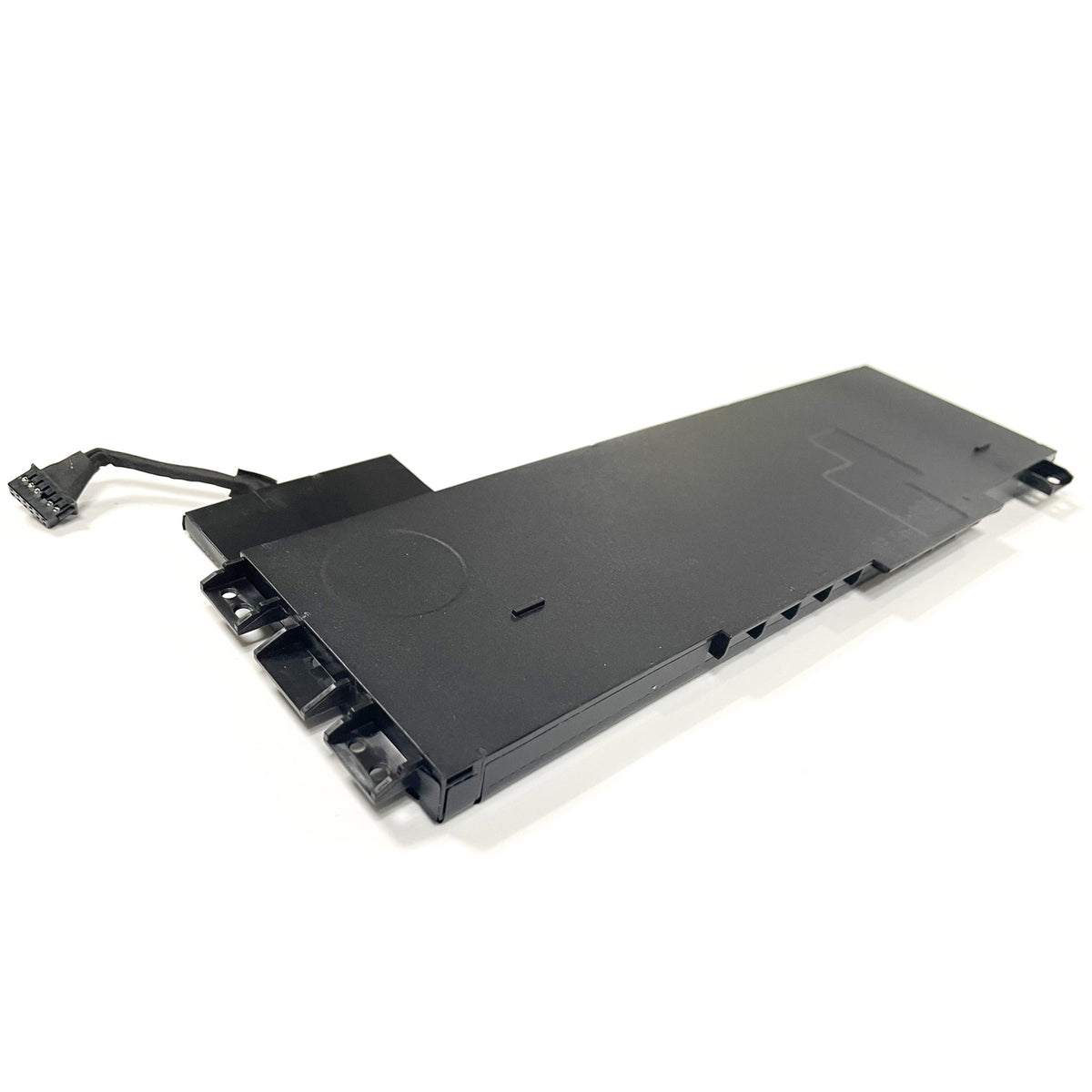
Genuine VV09XL Battery For HP ZBook 15 G3 G4 11.4V 90WH 808452-001 VV09090XL HSTNN-C87C
Genuine VV09XL Battery For HP ZBook 15 G3 G4 11.4V 90WH 808452-001 VV09090XL HSTNN-C87C
Limited-time offer
Couldn't load pickup availability


Genuine VV09XL Battery for HP ZBook 15 G3 G4 – 11.4V 90Wh
The VV09XL battery is a genuine replacement battery for selected HP ZBook 15 G3 and ZBook 15 G4 laptops. It uses a 6-cell Li-ion design and provides 11.4V and 90Wh capacity.
This battery is a suitable replacement for an old or worn battery that no longer holds a charge or provides enough operating time. It is compatible with several HP ZBook 15 G3 and G4 models and replaces a range of HP battery part numbers, including 808452-001, VV09090XL, and HSTNN-C87C.
Before purchasing, please check your laptop model and the part number on your original battery. You should also compare the battery connector and physical layout to make sure the replacement is suitable for your laptop.
Product Specifications
| Specification | Details |
|---|---|
| Battery Type | Li-ion |
| Condition | Genuine |
| Voltage | 11.4V |
| Capacity | 90Wh |
| Battery Cells | 6-Cell |
| Compatible Part Numbers | VV09XL, VV09090XL, 808452-001, HSTNN-C87C |
| Compatible Laptops | HP ZBook 15 G3 / G4 |
| Package | 1 × Battery |
Replace Part Numbers
This VV09XL replacement battery is compatible with the following part numbers:
-
808398-2B1
-
808398-2B2
-
808398-2C1
-
808398-2C2
-
808452-001
-
808452-002
-
HSTNN-C87C
-
HSTNN-DB7D
-
VV09090XL
-
VV09XL
Compatible HP ZBook Models
HP ZBook 15 G3 Series
Compatible models include:
-
T7V50EA
-
V2W07UT
-
T7V57EA
-
Y6J87ES
-
T7V51ET
-
X3W51AW
-
Y6J57ET
-
T7V61ET
-
T7V52ET
-
Y6J59ET
-
V2C98AW
-
T7V55EA
-
V2W05UT
-
T7V56ET
-
T7V51EA
-
Y3Z09ES
-
V2W12UT
-
T7V58ET
-
T7V54EA
-
T7V52EA
-
X9T85UT
-
Y6J59EA
-
V1H59UT
-
T7V53EA
-
V2D00AW
Also compatible with the HP ZBook 15 G3 Mobile Workstation Series.
HP ZBook 15 G4 Series
Compatible models include:
-
Y6K27EA
-
1RR24ES
-
1RQ64EA
-
Y6K18EA
-
2ZB95ES
-
2ZB97ES
-
Y6K21EA
-
Y4E77AV
-
Y6K19EA
-
Y6K29EA
-
1RQ65EA
-
Y4E80AV
Safety Features
The battery includes multiple protection functions to help improve safe operation:
-
UL / CE / FCC / RoHS certified
-
Overload protection
-
Over-current protection
-
Over-voltage protection
-
High-voltage protection
-
Short-circuit protection
-
Over-temperature protection
How to Check Your HP Laptop Model
Method 1: Check the Model in Windows
-
Press Windows + R on your keyboard.
-
Type msinfo32 and click OK.
-
Find System Model in the System Information window.
Method 2: Check the Original Battery
Turn off the laptop and remove the battery if the battery is removable. Check the label on the original battery for the part number.
Look for numbers such as VV09XL, VV09090XL, 808452-001, or HSTNN-C87C.
How to Install and Use a New Battery
Before installing the new battery, turn off the laptop and disconnect the power adapter.
After installation, make sure the battery connector is firmly connected to the system board.
For a new Li-ion battery, normal charging and discharging cycles are usually enough for the battery level indicator to become more accurate. Avoid intentionally discharging the battery to 0% on a regular basis.
What If the Battery Is Not Recognized?
If your HP laptop does not recognize the new battery:
-
Turn off the laptop and check the battery connection.
-
Make sure the battery connector is inserted correctly and firmly.
-
Restart the laptop.
-
Check for available BIOS updates from HP.
-
If the battery is still not recognized, please contact us for assistance.
What If the Battery Does Not Work?
If the battery does not work after installation, please contact us first.
We will help you check the problem and can arrange a replacement or refund according to the order situation.
What If the Package Is Not Received?
If your package has not arrived within the expected delivery time, please contact us first.
Some deliveries may be delayed by weather or other unexpected factors. If the package cannot be delivered, we can arrange a replacement or refund according to the situation.


Genuine VV09XL Battery for HP ZBook 15 G3 G4 – 11.4V 90Wh
The VV09XL battery is a genuine replacement battery for selected HP ZBook 15 G3 and ZBook 15 G4 laptops. It uses a 6-cell Li-ion design and provides 11.4V and 90Wh capacity.
This battery is a suitable replacement for an old or worn battery that no longer holds a charge or provides enough operating time. It is compatible with several HP ZBook 15 G3 and G4 models and replaces a range of HP battery part numbers, including 808452-001, VV09090XL, and HSTNN-C87C.
Before purchasing, please check your laptop model and the part number on your original battery. You should also compare the battery connector and physical layout to make sure the replacement is suitable for your laptop.
Product Specifications
| Specification | Details |
|---|---|
| Battery Type | Li-ion |
| Condition | Genuine |
| Voltage | 11.4V |
| Capacity | 90Wh |
| Battery Cells | 6-Cell |
| Compatible Part Numbers | VV09XL, VV09090XL, 808452-001, HSTNN-C87C |
| Compatible Laptops | HP ZBook 15 G3 / G4 |
| Package | 1 × Battery |
Replace Part Numbers
This VV09XL replacement battery is compatible with the following part numbers:
-
808398-2B1
-
808398-2B2
-
808398-2C1
-
808398-2C2
-
808452-001
-
808452-002
-
HSTNN-C87C
-
HSTNN-DB7D
-
VV09090XL
-
VV09XL
Compatible HP ZBook Models
HP ZBook 15 G3 Series
Compatible models include:
-
T7V50EA
-
V2W07UT
-
T7V57EA
-
Y6J87ES
-
T7V51ET
-
X3W51AW
-
Y6J57ET
-
T7V61ET
-
T7V52ET
-
Y6J59ET
-
V2C98AW
-
T7V55EA
-
V2W05UT
-
T7V56ET
-
T7V51EA
-
Y3Z09ES
-
V2W12UT
-
T7V58ET
-
T7V54EA
-
T7V52EA
-
X9T85UT
-
Y6J59EA
-
V1H59UT
-
T7V53EA
-
V2D00AW
Also compatible with the HP ZBook 15 G3 Mobile Workstation Series.
HP ZBook 15 G4 Series
Compatible models include:
-
Y6K27EA
-
1RR24ES
-
1RQ64EA
-
Y6K18EA
-
2ZB95ES
-
2ZB97ES
-
Y6K21EA
-
Y4E77AV
-
Y6K19EA
-
Y6K29EA
-
1RQ65EA
-
Y4E80AV
Safety Features
The battery includes multiple protection functions to help improve safe operation:
-
UL / CE / FCC / RoHS certified
-
Overload protection
-
Over-current protection
-
Over-voltage protection
-
High-voltage protection
-
Short-circuit protection
-
Over-temperature protection
How to Check Your HP Laptop Model
Method 1: Check the Model in Windows
-
Press Windows + R on your keyboard.
-
Type msinfo32 and click OK.
-
Find System Model in the System Information window.
Method 2: Check the Original Battery
Turn off the laptop and remove the battery if the battery is removable. Check the label on the original battery for the part number.
Look for numbers such as VV09XL, VV09090XL, 808452-001, or HSTNN-C87C.
How to Install and Use a New Battery
Before installing the new battery, turn off the laptop and disconnect the power adapter.
After installation, make sure the battery connector is firmly connected to the system board.
For a new Li-ion battery, normal charging and discharging cycles are usually enough for the battery level indicator to become more accurate. Avoid intentionally discharging the battery to 0% on a regular basis.
What If the Battery Is Not Recognized?
If your HP laptop does not recognize the new battery:
-
Turn off the laptop and check the battery connection.
-
Make sure the battery connector is inserted correctly and firmly.
-
Restart the laptop.
-
Check for available BIOS updates from HP.
-
If the battery is still not recognized, please contact us for assistance.
What If the Battery Does Not Work?
If the battery does not work after installation, please contact us first.
We will help you check the problem and can arrange a replacement or refund according to the order situation.
What If the Package Is Not Received?
If your package has not arrived within the expected delivery time, please contact us first.
Some deliveries may be delayed by weather or other unexpected factors. If the package cannot be delivered, we can arrange a replacement or refund according to the situation.
| Model No | VV09XL |
| Warranty | 1 Year |
🔋 Lithium-Ion Battery Conditioning
For optimal electrochemical performance, new lithium-ion batteries should undergo 2–3 complete charge and discharge cycles before reaching full capacity.
This stabilization phase allows the internal cell chemistry to achieve balanced ion distribution, ensuring maximum runtime, stable voltage output, and extended cycle life.
After this initial conditioning period, no further full discharge cycles are required.
🛡 Premium Warranty Protection
- 12-Month Limited Manufacturer Warranty
- Up to 30-Day Return Guarantee (Policy Based)
- Replacement for defective or misrepresented items
- Dedicated customer service response within 24 hours
🚚 Professional Shipping Standards
- Orders placed Monday–Friday are processed within 1–2 business days. Orders placed on weekends are processed the following Monday.
- Tracking information appears in your order within 1–2 business days after dispatch.
- Transit time varies by region and logistics carrier
- Please verify your shipping address before order confirmation
- Address changes are not possible once shipment is dispatched
📌 Product-Specific Notice
📩 Customer Care Commitment
We are committed to delivering professional-grade battery solutions and responsive after-sales service. If you experience any issues, please contact our support team before leaving feedback.
✓ Safety & Quality Assurance
- Built-in protection against overcharging, overheating, and short circuits.
- Shipped in compliance with IATA regulations for lithium batteries.
- Compatible with OEM chargers. No firmware modification required.
Questions about compatibility? Contact us with your device model number before ordering.
Cao Chuanping
Power Systems Consultant · 8+ years in replacement battery sourcing & evaluation · View profile →


