Roomba Battery — Frequently Asked Questions
How much should a Roomba replacement battery actually cost — when is a price too low to trust?
A quality aftermarket Roomba battery costs $28–$50 for most models. OEM iRobot batteries run $55–$149. Danger zones: NiMH below $22, Li-ion below $28. Below those thresholds, the BMS (Battery Management System) almost certainly lacks cell balancing — the #1 cause of early failure and swelling.
Quick checklist before buying: look for UL 2054 or CE marks, UN38.3 compliance, and all four BMS protections named explicitly (overcharge, over-discharge, short-circuit, and cell balancing). If the listing says "safety chip included" without naming all four, skip it.
Read the full cost guide →
Is it worth paying $80 for an OEM iRobot battery, or is a $35 aftermarket one just as good?
For most out-of-warranty Roombas, a quality aftermarket battery at $35–$50 delivers nearly identical performance. The lithium cells often come from the same global suppliers (Samsung, LG, Panasonic). The real difference is the BMS quality.
Real-world 12-month test on four aftermarket packs in an i7:
- $49 pack: 3190mAh actual, 91% health after 12 months — excellent.
- $35 pack: 3010mAh actual, 86% health — perfectly usable.
- $25 pack: 2240mAh actual, 62% health — declining fast.
- $22 pack: 1980mAh actual, swollen at 8 months — fire hazard.
The sweet spot is $35–$50. iRobot has confirmed that using an aftermarket battery does not void your robot's warranty (though damage from a faulty third-party battery is excluded).
Full OEM vs aftermarket comparison →
I found a Roomba i7 battery on Amazon for $22 claiming 4500mAh — is that legit?
No — it's physically impossible. The i7 battery compartment can only fit cells up to about 3500mAh. A 4500mAh claim at $22 means the seller printed fake numbers. Our teardown of a similar pack found actual capacity was 1980mAh — less than half the label claim. The pack lacked cell balancing and swelled dangerously by month 8.
Rule of thumb: if a Roomba Li-ion battery claims more than 3500mAh and costs under $28, it's fake.
How to spot fake batteries →
Just installed a new Roomba battery — why does the meter show 80% but the robot dies in 10 minutes?
If it's a NEW battery: you skipped calibration. The BMS doesn't yet know the true voltage floor. Fix: run 2–3 full calibration cycles — charge to solid green, run until the robot physically stops (not just "return to dock"), then charge fully again. The meter will stabilize after cycle 2 or 3.
If it's an OLD battery: this is voltage collapse — the cells hold a surface charge but can't sustain voltage under load. Not fixable; replace the battery.
Full reset & calibration guide →
How do I reset my Roomba battery — and is resetting the same as calibrating?
Resetting ≠ calibrating.
- Reset: clears software errors. Hold CLEAN button 10 seconds off the dock until the light ring pulses, then redock. Fixes fast amber blinking, Error 5, and "Unable to charge" messages.
- Calibration: teaches the BMS true voltage limits. Takes 2–3 full charge/discharge cycles. Charge to solid green → run until motors cut out completely (not when it tries to dock) → charge fully → repeat.
Most common mistake: letting the Roomba return to the dock during calibration. The navigation system triggers "return to dock" at ~10–15% battery, but the BMS needs to see the lower voltage floor where motors actually stop.
Step-by-step reset instructions →
My Roomba 650 is flashing amber fast and won't charge — is the battery dead?
Fast amber blinking is a charge negotiation failure — and roughly 30% of cases are just oxidized contacts, not a dead battery. Try this sequence:
- Clean contacts with rubbing alcohol on both the robot pads AND dock contacts. Scrub until shiny.
- Check dock power: light on? Cord seated? Outlet working?
- Measure dock voltage: multimeter on DC across charging contacts — functional = ~22V. Below 18V = dock failing. Zero = no power.
- System reset: off dock, hold CLEAN 10 seconds, redock.
- Reseat battery: remove completely, wait 30 seconds, reinstall until connector clicks.
- Try different outlet on a different circuit.
If none work, test on a known-good dock. If it charges → your dock failed. If not → battery failed. For a 650 (NiMH) with 18+ months of daily use, a quality replacement costs $28–$40.
Full error code reference →
My Roomba i7 used to clean for 75 minutes — now it dies after 40. Time to replace?
Yes — 40 minutes on hard floor is the replacement threshold. The i7 ABL-D1 battery (3300mAh, 14.4V) degrades about 0.05% per cycle:
- 50 cycles: 74 min (98%)
- 100 cycles: 72 min (96%)
- 200 cycles: 69 min (93%)
- 300 cycles: 65 min (88%)
- 400 cycles: 60 min (82%)
Most users replace between 350–450 cycles. Before buying: check if the drop was SUDDEN (overnight, after an app update). The 2024–2025 firmware battery-drain bug on i7 and j7 models caused instant runtime drops — a software issue, not a battery failure. Check your firmware version in the iRobot app and search online before spending money on hardware.
Full i7 battery guide →
Does the Roomba i7 battery also fit the i8?
Yes — identical. The i7 and i8 use the same ABL-D1 battery (14.4V, 3300mAh, white 4-pin connector). The i8 is the same robot as the i7 with different accessories in the box. It also fits: i4, i4+, j7, j7+, e5, e6.
Replacement takes about 3 minutes: two Phillips screws, one connector. After installing, run 2–3 calibration cycles.
i7/i8 battery details →
My i7 runtime dropped to 20 minutes right after a firmware update — do I need a new battery?
Probably not. During 2024–early 2025, multiple iRobot firmware updates caused sudden battery drain on i7 and j7 models. Key symptom: runtime collapses instantly after an update, rather than declining gradually over months.
Before buying a replacement: check your firmware version in the iRobot app (Settings → About → Firmware Version). Search online for that version + "battery drain." If others report the same issue, wait for a software fix — replacing hardware won't solve it.
i7 firmware issue details →
My Roomba is blinking red and beeping — what do the error codes mean?
Roomba uses colors, blinks, and beeps to signal faults:
- Solid green: battery full — normal.
- Slow pulsing amber: charging normally — leave on dock.
- Fast blinking amber: charge negotiation failure — clean contacts and reset.
- Solid red: critically low (under 5%) — dock immediately.
- Blinking red: BMS fault — reset; if it persists, battery likely dead.
Numbered errors:
- Error 5: charging error — usually external (clean contacts, test dock).
- Error 6: battery too hot — cool 1 hour.
- Error 7: battery too cold — warm to room temp.
- Error 8: battery not accepting charge — clean, reset, test alternate dock.
- Error 14: communication failure — clean contacts, reset both dock and robot.
- Error 19: internal BMS fault — battery needs replacement.
Complete error code reference →
Roomba dock light is on but robot won't charge — dock or battery problem?
Test with a multimeter (DC voltage mode) across the dock's charging contacts:
- ~22V DC = dock is healthy → battery or robot is the problem.
- Below 18V = dock failing → replace dock (~$30–$50).
- Zero = no power → check cord and outlet.
Final confirmation: test the robot on a known-good dock (friend, neighbor, or repair shop). If it charges → your dock failed. If it won't charge on any dock → battery is the most likely cause.
Dock testing guide →
How do I replace the battery in my Roomba — which models need tools?
- 600 / 700 / 800 series: no tools needed. Flip robot, release latch, unplug old battery (pull by plastic housing — never the wires), plug in new one. ~1 minute.
- i3 / i7 / i8 / s9: small Phillips screwdriver needed. Remove bottom screws, lift cover, unplug white 4-pin connector (lift tab with fingernail — no metal near terminals), connect new battery until click, replace cover. ~3 minutes.
- j5 / j7 / j9 / Combo j series: sealed — not user-replaceable. iRobot charges $99–$149 for service-center replacement.
After installation — CRITICAL: run 2–3 calibration cycles (charge full → run until it stops → charge full → repeat) so the BMS learns the true capacity.
Complete battery replacement guide →
Can I upgrade my old Roomba 650 from NiMH to a lithium-ion battery?
Yes — but only with a Li-ion pack that includes a proper BMS. The 600-series dock was designed for NiMH charging. A Li-ion upgrade must have a BMS chip that tells the dock "Stop, I'm full" — without it, the dock's trickle charging will overcharge and potentially burn out the Li-ion pack.
Confirm the listing names all four BMS protections: overcharge, over-discharge, short-circuit, and cell balancing. A quality Li-ion upgrade for 600 series costs $35–$50. Same battery (part 4905, 14.4V) fits 600, 700, and 800 series.
Roomba battery compatibility chart →
How long should a Roomba battery last — and what kills it faster?
- OEM Li-ion (i7, s9): 82% capacity at 400 cycles (~3 years with daily use).
- OEM NiMH (600/700/800): 55% at 400 cycles (~1.5–2 years).
- Cheap aftermarket without cell balancing: died at 347 cycles — unpredictable.
What kills batteries fastest:
- Heat — #1 enemy. Keep dock away from sunlight, radiators, enclosed cabinets.
- Dirty brush/filter — forces motor to work harder, drawing more current.
- Constant 100% charge (NiMH) — run a full discharge every 2–3 weeks.
- Firmware bugs — delay app updates until others confirm no battery issues.
Full battery care guide →
How do I safely dispose of an old or swollen Roomba battery?
Never throw in household trash. Lithium and NiMH batteries can cause fires in garbage trucks and landfills.
Normal battery:
- Tape over the metal terminals with electrical tape.
- Drop off at Call2Recycle bins at Home Depot, Lowe's, Best Buy, or Staples — free.
- Find a local hazardous waste site at Earth911.com.
Swollen battery (bulging case):
- Do NOT put in retail drop-off bins.
- Place in a metal container with sand or cat litter.
- Transport directly to a household hazardous waste facility.
- Do not puncture, crush, or try to "deflate" a swollen battery.
Safe disposal instructions →
Which Roomba batteries are interchangeable between models?
Quick reference:
- 600 / 700 / 800 series: ALL share the same battery (part 4905) — fully interchangeable across all three generations.
- 900 series: unique battery (4639157) — NOT interchangeable with i-series.
- e5 / e6 / i3 / i3+: share battery 4649786 / 4664052 (2210mAh).
- i7 / i7+ / i8 / i8+ / i4 / i4+: share ABL-D1 (4649785, 3300mAh) — also fits e5, e6, j7.
- s9 / s9+: unique battery (4661886) — NOT interchangeable with any other series.
- j5 / j7 / j9 / Combo: sealed inside — NOT user-replaceable. iRobot charges $99–$149 for service.
Full compatibility chart →
How do I find the correct battery part number for my Roomba?
Flip the robot over and read the label on your existing battery. Then match it to the part numbers we carry:
Roomba 500, 600, 700, 800, 900 series:
- 4376392 — 14.4V, 3300mAh, 48Wh Li-ion. Fits 615/640/652/665/670/680/681/691/696/891/896/960/965/980/985. $49.99
- 1800LI — 14.4V, 1800mAh Li-ion. Also fits all 500–900 series. $49.99
- XLife Extended Life — compatible with 600, 700, 800 series, including 650/770/620/530/580. $49.99
Roomba i7, i7+, i8, i8+, i4, i4+, e5, e6:
- ABL-D1 — 14.4V Li-ion. Fits i7/i7+/i8/i8+/i4/i4+/e5/e6/j7/j7+. $49.99
- ABL-D2 / ABL-D2A — 14.4V, 32Wh Li-ion. Fits i7/i7+/i8/i8+/i4/i4+/i3/i6/e5/e6/j7/j7+/j8+/Combo i5/j5/j9. $49.99
- ABL-F — 14.4V, 4460mAh, 64.2Wh Li-ion (4INR19/66-2). Extended capacity for i7/i3/i4/i8/e5/e6. Not for Combo series. $69.99
Roomba j5, j6, j7, j8, j9, Combo:
- ABL-F (Original) — fits J5+/J6+/J7/J7+/J8/J8+/J9/J9+/i8+/i6. $69.99
- Also covered by ABL-D2 above for most j-series models
Roomba s9, s9+:
- ABL-B — 14.4V, 3300mAh, 48Wh Li-ion (4INR19/65-2). ONLY fits s9 9150 and s9+ 9550 — not interchangeable with i-series. $49.99
Braava Jet M6 (mopping robot):
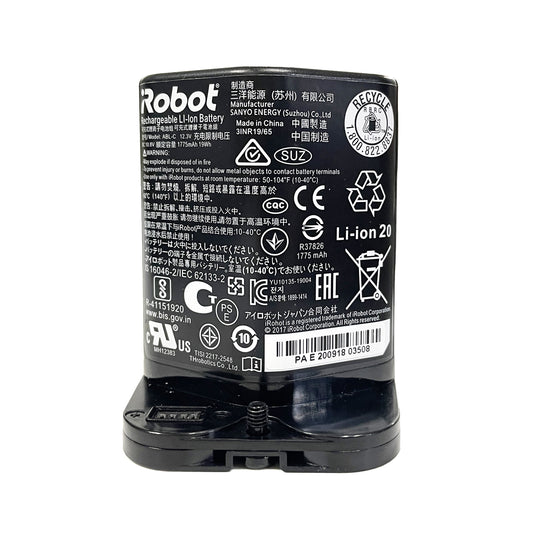
- ABL-C — 10.8V, 1775mAh, 19Wh Li-ion (3INR 19/65). Fits Braava Jet M6 6110/6100 series. $69.99
All Roomba vacuum batteries operate at 14.4V nominal (except Braava Jet M6 at 10.8V). If your battery label is worn off, find your robot's model number printed on the underside near the wheels, then match it above. Still unsure? Email us a photo of your robot and old battery — we'll confirm the right part within 24 hours.
Complete model reference →